
Passkeys Are Melting Passwords: Lessons from World Passkey Day 2025
Passkeys just cleared a giant milestone: most everyday people, including me, finally know what they are and prefer them to passwords.
A FIDO Alliance survey released on World Passkey Day 2025 says 74% of consumers recognize the word "passkey," and two-thirds who've tried one never want to go back. That stat hit home because, after years of juggling OTP texts in crowded Indian cafés and watching data-breach headlines pile up, I'm convinced good privacy tech has to feel effortless.
The piece below is a user's-eye tour of why passkeys matter, how they already work in banking, travel and SaaS apps I touch every day, and the simple steps anyone can take to ditch the password grind.
My three-year passkey journey
I first came across passkeys back in 2022 when tech giants started implementing them on their platforms. Back then, it felt like another Silicon Valley experiment that might disappear in a year. Fast forward to 2025, and I just used a passkey to access my membership information and borrow books at my local library branch. The technology that started with Google and Apple has now reached the most ordinary corners of my community. Is this the ultimate sign that a digital revolution has gone mainstream? I believe so.
Growing up with password fatigue (and breach anxiety)
I still remember the night a popular Indian food-delivery app leaked customer data; friends spent hours resetting log-ins while I frantically scanned my inbox for breach emails. Every breach reminder hammered home how fragile the "something-you-know" model is—especially when recycled across dozens of sites. Passkeys flip that script. They tie access to a device I control and a biometric that stays on the device, so there's nothing reusable for thieves to steal or phish.
World Passkey Day in plain English
- 74% awareness. For the first time, a privacy-preserving login is something even my non-tech parents recognize.
- 69% stickiness. Once people try a passkey, they enable it wherever they can.
- Perceived safety. Over half of users say passkeys feel more secure than passwords.
World Passkey Day 2025 wasn't a marketing holiday; it was the moment passwords officially became the clunky fallback.
Why passkeys feel better in real life
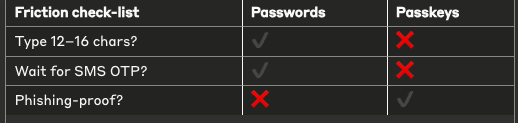
Speed & success. Microsoft reports a 98% sign-in success rate with passkeys versus just 32% for passwords. The experience is eight times faster because the device verifies me instantly.
Scale. Google says passkeys have logged people in over a billion times across 400 million accounts in under a year. If Big Tech can move that quickly, mainstream apps are next.
Four everyday places I’ve already met passkeys
1 — Ecommerce: Shopify and Shop Pay
Shopify, one of Canada’s tech giants, has rolled out passkey support for both merchants and shoppers. You can now sign in to your Shopify account or breeze through Shop Pay checkout using a passkey-no passwords, no SMS codes, just a quick fingerprint or Face ID and you’re done. With over 100 million Shop users able to authenticate this way, it’s the kind of frictionless experience that makes you forget passwords ever existed.
2 — Travel-tech: no more midnight "forgot password"
Air New Zealand rolled out passkeys in its app and saw a 30% opt-in on day one; abandoned logins dropped by 50%. Booking a flight at 2 a.m. from Vancouver felt delightfully boring—I tapped, Face ID verified, done. Privacy and convenience showed up together for once.
3 — SaaS tools: sign-up without email ping-pong
GitHub made passkeys generally available in 2023. Creating a side-project repo now takes one fingerprint instead of a password + verification email loop. For anyone who lives in product dashboards all day, that's the difference between staying in flow and breaking it.
4 — Fintech: PayPal Canada
PayPal has expanded passkey support to Canadian users, letting you log in securely with biometrics or a device PIN instead of a password. The process is as easy as authenticating with Face ID or your Android fingerprint, and once you set it up, passkey becomes your default login method. As a Canadian dealing with our cold winters, not having to remove gloves to type passwords on my phone has been an unexpected but welcome benefit.
Behavioral nudge I noticed as a user
I didn't switch because of white-papers; I switched because apps made passkeys the default. Behavioral economics calls it status-quo bias—people stick with the option that requires the least effort. When "Use passkey" is the first big button and the password field is hidden under "Other methods," I follow the path of least resistance—and end up safer without thinking about it.
How to get started right now
-
Check device settings. iOS 17, Android 14 and Windows 11 all store passkeys natively—nothing to install.
-
Add on a high-value account first. Google or Microsoft offer the widest passkey support today; enable it there to feel the speed boost.
-
Look for the logo. Many banking and travel apps now show a little key-icon or “Sign in with passkey” banner—tap it once; your device will remember.
-
Backup wisely. Most ecosystems sync encrypted passkeys across your signed-in devices (iCloud Keychain, Google Password Manager). That means if you upgrade phones, your passkeys travel with you—no sticky-note passwords required.
Why am I talking about this?
As a writer obsessed with privacy-first tech, I want my words to do what passkeys do: make the secure choice feel like the obvious, effortless one. If you’re building a product and wondering whether users are ready to lose the password, let my own switch be the answer: the future logged in with one tap, and I barely noticed, except that I finally felt safe.
Written from a privacy-first user’s lens to show product teams how effortless security wins hearts (and conversion funnels).
Post a comment